


Showing posts with label C#. Show all posts
Showing posts with label C#. Show all posts
Small Introduction To C#
I would like to share this document with you all peoples who are from IT background....
This was one of the simplest document i got on net.....
Introduction To C# Part 1VB.Net vs C-Sharp
Saturday, 7 January 2012
VB.Net vs C-Sharp Comparison is a very concise reference for commands you use every day. Print it out, hang it on the wall where it will not get lost, and use it every day.
Feature | Visual Basic .NET | Visual C# .NET |
| Case sensitive | Not case sensitive: response.write("Yo") 'OK | Case sensitive: response.write("Yo"); //Error Response.Write("Yo"); // OK |
| Functional blocks | Use beginning and ending statements to declare functional blocks of code: Sub Show(strX as String) Response.Write(strX) End Sub | Use braces to declare functional blocks of code: void Show (string strX) { Response.Write(strX); } |
| Type conversion | Implicit type conversions are permitted by default: Dim intX As Integer intX = 3.14 ' Permitted You can limit conversions by including an Option Strict On statement at the beginning of modules | Type conversions are performed explicitly by casts: int intX; intX = 3.14; // Error! intX = (int)3.14; //Cast, OK Or, use type conversion methods: string strX; strX = intX.ToString(); |
| Arrays | Array elements are specified using parentheses: arrFruit(1) = "Apple" | Array elements are specified using square brackets: arrFruit[1] = "Apple"; |
| Methods | Statement termination Statements are terminated by carriage return: Response.Write("Hello") | Statements are terminated by the semicolon (;): Response.Write("Hello"); |
| Statement continuation | Statements are continued using the underscore (_): intX = System.Math.Pi * _ intRadius | Statements continue until the semicolon (;) and can span multiple lines if needed: intX = System.Math.PI * intRadius; |
| String operator | Use the ampersand (&) or plus sign (+) to join strings: strFruit = "Apples" & _ " Oranges" | Use the plus sign (+) to join strings: strFruit = "Apples" + " Oranges"; |
| Comparison operators | Use =, >, <, >=, <=, <> to compare values: If intX >= 5 Then | Use ==, >, <, >=, <=, != to compare values: if (intX >= 5) |
| Negation | Use the Not keyword to express logical negation: If Not IsPostBack Then | Use the ! operator to express logical negation: if (!IsPostBack) |
| Object comparison | Use the Is keyword to compare object variables: If objX Is objY Then | Use == to compare object variables: if (objX == objY) |
| Object existence | Use the Nothing keyword or the IsNothing function to check if an object exists: If IsNothing(objX) Then | Use the null keyword to check if an object exists: if (objX == null) |
Code To Disable X(Close) Button On Your Form
Friday, 8 July 2011
Just Add The Following Code Anywhere In Your Windows Application And Your X(Close) Button Will Be Disables.
private const int dis_close_button = 0x200;
protected override CreateParams CreateParams
{
get
{
CreateParams ObjCP = base.CreateParams;
ObjCP.ClassStyle = ObjCP.ClassStyle | dis_close_button ;
return ObjCP;
}
}
protected override CreateParams CreateParams
{
get
{
CreateParams ObjCP = base.CreateParams;
ObjCP.ClassStyle = ObjCP.ClassStyle | dis_close_button ;
return ObjCP;
}
}
How To Draw Star On Your Windows Application
USING C#
- First Of All Open New Windows Application.
- Add Following Namespaces.
using System;
using System.Collections.Generic;
using System.ComponentModel;
using System.Data;
using System.Drawing;
using System.Text;
using System.Windows.Forms;
using System.Drawing.Drawing2D;
using System.Collections.Generic;
using System.ComponentModel;
using System.Data;
using System.Drawing;
using System.Text;
using System.Windows.Forms;
using System.Drawing.Drawing2D;
namespace Draw
{
public class DrawingForm : Form
{
public DrawingForm() //Create Constructor
{
//InitializeComponent
this.Text = "My drawings";
this.Size = new Size(600, 600);
this.Paint += new PaintEventHandler(MyPainting);
}
private void MyPainting(object sender, PaintEventArgs e)
{
Graphics G = e.Graphics;
G.SmoothingMode = SmoothingMode.HighQuality;
PointF[] Star1 = Calculate5StarPoints(new PointF(100f, 100f), 50f, 20f);
SolidBrush FillBrush = new SolidBrush(Color.Pink);
G.FillPolygon(FillBrush, Star1);
G.DrawPolygon(new Pen(Color.Purple, 5), Star1);
PointF[] Star2 = Calculate5StarPoints(new PointF(200f, 150f), 100f, 20f);
HatchBrush pat = new HatchBrush(HatchStyle.Cross, Color.RosyBrown, Color.IndianRed);
G.FillPolygon(pat, Star2);
PointF[] Star3 = Calculate5StarPoints(new PointF(350f, 300f), 200f, 100f);
LinearGradientBrush lin = new LinearGradientBrush(new Point(350, 100), new Point(350, 500),
Color.Salmon, Color.Cyan);
G.FillPolygon(lin, Star3);
PointF[] Star4 = Calculate5StarPoints(new PointF(140f, 400f), 120f, 10f);
G.DrawPolygon(new Pen(Color.LightSalmon, 3), Star4);
}
{
public class DrawingForm : Form
{
public DrawingForm() //Create Constructor
{
//InitializeComponent
this.Text = "My drawings";
this.Size = new Size(600, 600);
this.Paint += new PaintEventHandler(MyPainting);
}
private void MyPainting(object sender, PaintEventArgs e)
{
Graphics G = e.Graphics;
G.SmoothingMode = SmoothingMode.HighQuality;
PointF[] Star1 = Calculate5StarPoints(new PointF(100f, 100f), 50f, 20f);
SolidBrush FillBrush = new SolidBrush(Color.Pink);
G.FillPolygon(FillBrush, Star1);
G.DrawPolygon(new Pen(Color.Purple, 5), Star1);
PointF[] Star2 = Calculate5StarPoints(new PointF(200f, 150f), 100f, 20f);
HatchBrush pat = new HatchBrush(HatchStyle.Cross, Color.RosyBrown, Color.IndianRed);
G.FillPolygon(pat, Star2);
PointF[] Star3 = Calculate5StarPoints(new PointF(350f, 300f), 200f, 100f);
LinearGradientBrush lin = new LinearGradientBrush(new Point(350, 100), new Point(350, 500),
Color.Salmon, Color.Cyan);
G.FillPolygon(lin, Star3);
PointF[] Star4 = Calculate5StarPoints(new PointF(140f, 400f), 120f, 10f);
G.DrawPolygon(new Pen(Color.LightSalmon, 3), Star4);
}
private PointF[] Calculate5StarPoints(PointF Orig, float outerradius, float innerradius)
{
double Ang36 = Math.PI / 5.0; // 36° x PI/180
double Ang72 = 2.0 * Ang36; // 72° x PI/180
float Sin36 = (float)Math.Sin(Ang36);
float Sin72 = (float)Math.Sin(Ang72);
float Cos36 = (float)Math.Cos(Ang36);
float Cos72 = (float)Math.Cos(Ang72);
PointF[] pnts = { Orig, Orig, Orig, Orig, Orig, Orig, Orig, Orig, Orig, Orig };
pnts[0].Y -= outerradius; // top off the star, or on a clock this is 12:00 or 0:00 hours
pnts[1].X += innerradius * Sin36; pnts[1].Y -= innerradius * Cos36; // 0:06 hours
pnts[2].X += outerradius * Sin72; pnts[2].Y -= outerradius * Cos72; // 0:12 hours
pnts[3].X += innerradius * Sin72; pnts[3].Y += innerradius * Cos72; // 0:18
pnts[4].X += outerradius * Sin36; pnts[4].Y += outerradius * Cos36; // 0:24
pnts[5].Y += innerradius;
pnts[6].X += pnts[6].X - pnts[4].X; pnts[6].Y = pnts[4].Y; // mirror point
pnts[7].X += pnts[7].X - pnts[3].X; pnts[7].Y = pnts[3].Y; // mirror point
pnts[8].X += pnts[8].X - pnts[2].X; pnts[8].Y = pnts[2].Y; // mirror point
pnts[9].X += pnts[9].X - pnts[1].X; pnts[9].Y = pnts[1].Y; // mirror point
return pnts;
}
private void InitializeComponent()
{
this.SuspendLayout();
this.ClientSize = new System.Drawing.Size(292, 266);
this.Name = "DrawingForm";
this.Load += new System.EventHandler(this.DrawingForm_Load);
this.ResumeLayout(false);
}
private void DrawingForm_Load(object sender, EventArgs e)
{
}
}
public class Program
{
[STAThread]
public static int Main()
{
Application.Run(new DrawingForm());
return 0;
}
}
}
{
double Ang36 = Math.PI / 5.0; // 36° x PI/180
double Ang72 = 2.0 * Ang36; // 72° x PI/180
float Sin36 = (float)Math.Sin(Ang36);
float Sin72 = (float)Math.Sin(Ang72);
float Cos36 = (float)Math.Cos(Ang36);
float Cos72 = (float)Math.Cos(Ang72);
PointF[] pnts = { Orig, Orig, Orig, Orig, Orig, Orig, Orig, Orig, Orig, Orig };
pnts[0].Y -= outerradius; // top off the star, or on a clock this is 12:00 or 0:00 hours
pnts[1].X += innerradius * Sin36; pnts[1].Y -= innerradius * Cos36; // 0:06 hours
pnts[2].X += outerradius * Sin72; pnts[2].Y -= outerradius * Cos72; // 0:12 hours
pnts[3].X += innerradius * Sin72; pnts[3].Y += innerradius * Cos72; // 0:18
pnts[4].X += outerradius * Sin36; pnts[4].Y += outerradius * Cos36; // 0:24
pnts[5].Y += innerradius;
pnts[6].X += pnts[6].X - pnts[4].X; pnts[6].Y = pnts[4].Y; // mirror point
pnts[7].X += pnts[7].X - pnts[3].X; pnts[7].Y = pnts[3].Y; // mirror point
pnts[8].X += pnts[8].X - pnts[2].X; pnts[8].Y = pnts[2].Y; // mirror point
pnts[9].X += pnts[9].X - pnts[1].X; pnts[9].Y = pnts[1].Y; // mirror point
return pnts;
}
private void InitializeComponent()
{
this.SuspendLayout();
this.ClientSize = new System.Drawing.Size(292, 266);
this.Name = "DrawingForm";
this.Load += new System.EventHandler(this.DrawingForm_Load);
this.ResumeLayout(false);
}
private void DrawingForm_Load(object sender, EventArgs e)
{
}
}
public class Program
{
[STAThread]
public static int Main()
{
Application.Run(new DrawingForm());
return 0;
}
}
}

USING VB
The Above Code Will Look As follows When Writen In VB.
Imports System.Collections.Generic
Imports System.ComponentModel
Imports System.Data
Imports System.Drawing
Imports System.Text
Imports System.Windows.Forms
Imports System.Drawing.Drawing2D
Namespace Draw
Public Class DrawingForm
Inherits Form
Public Sub New()
Me.Text = "My drawings"
Me.Size = New Size(600, 600)
AddHandler Me.Paint, New PaintEventHandler(AddressOf MyPainting)
End Sub
Private Sub MyPainting(sender As Object, e As PaintEventArgs)
Dim G As Graphics = e.Graphics
G.SmoothingMode = SmoothingMode.HighQuality
Dim Star1 As PointF() = Calculate5StarPoints(New PointF(100F, 100F), 50F, 20F)
Dim FillBrush As New SolidBrush(Color.Pink)
G.FillPolygon(FillBrush, Star1)
G.DrawPolygon(New Pen(Color.Purple, 5), Star1)
Dim Star2 As PointF() = Calculate5StarPoints(New PointF(200F, 150F), 100F, 20F)
Dim pat As New HatchBrush(HatchStyle.Cross, Color.RosyBrown, Color.IndianRed)
G.FillPolygon(pat, Star2)
Dim Star3 As PointF() = Calculate5StarPoints(New PointF(350F, 300F), 200F, 100F)
Dim lin As New LinearGradientBrush(New Point(350, 100), New Point(350, 500), Color.Salmon, Color.Cyan)
G.FillPolygon(lin, Star3)
Dim Star4 As PointF() = Calculate5StarPoints(New PointF(140F, 400F), 120F, 10F)
G.DrawPolygon(New Pen(Color.LightSalmon, 3), Star4)
End Sub
Private Function Calculate5StarPoints(Orig As PointF, outerradius As Single, innerradius As Single) As PointF()
Dim Ang36 As Double = Math.PI / 5.0
Dim Ang72 As Double = 2.0 * Ang36
Dim Sin36 As Single = CSng(Math.Sin(Ang36))
Dim Sin72 As Single = CSng(Math.Sin(Ang72))
Dim Cos36 As Single = CSng(Math.Cos(Ang36))
Dim Cos72 As Single = CSng(Math.Cos(Ang72))
Dim pnts As PointF() = {Orig, Orig, Orig, Orig, Orig, Orig, _
Orig, Orig, Orig, Orig}
pnts(0).Y -= outerradius
pnts(1).X += innerradius * Sin36
pnts(1).Y -= innerradius * Cos36
pnts(2).X += outerradius * Sin72
pnts(2).Y -= outerradius * Cos72
pnts(3).X += innerradius * Sin72
pnts(3).Y += innerradius * Cos72
pnts(4).X += outerradius * Sin36
pnts(4).Y += outerradius * Cos36
pnts(5).Y += innerradius
pnts(6).X += pnts(6).X - pnts(4).X
pnts(6).Y = pnts(4).Y
pnts(7).X += pnts(7).X - pnts(3).X
pnts(7).Y = pnts(3).Y
pnts(8).X += pnts(8).X - pnts(2).X
pnts(8).Y = pnts(2).Y
pnts(9).X += pnts(9).X - pnts(1).X
pnts(9).Y = pnts(1).Y
Return pnts
End Function
Private Sub InitializeComponent()
Me.SuspendLayout()
Me.ClientSize = New System.Drawing.Size(292, 266)
Me.Name = "DrawingForm"
AddHandler Me.Load, New System.EventHandler(AddressOf Me.DrawingForm_Load)
Me.ResumeLayout(False)
End Sub
Private Sub DrawingForm_Load(sender As Object, e As EventArgs)
End Sub
End Class
Public Class Program
Public Shared Function Main() As Integer
Application.Run(New DrawingForm())
Return 0
End Function
End Class
End Namespace
Dim Ang36 As Double = Math.PI / 5.0
Dim Ang72 As Double = 2.0 * Ang36
Dim Sin36 As Single = CSng(Math.Sin(Ang36))
Dim Sin72 As Single = CSng(Math.Sin(Ang72))
Dim Cos36 As Single = CSng(Math.Cos(Ang36))
Dim Cos72 As Single = CSng(Math.Cos(Ang72))
Dim pnts As PointF() = {Orig, Orig, Orig, Orig, Orig, Orig, _
Orig, Orig, Orig, Orig}
pnts(0).Y -= outerradius
pnts(1).X += innerradius * Sin36
pnts(1).Y -= innerradius * Cos36
pnts(2).X += outerradius * Sin72
pnts(2).Y -= outerradius * Cos72
pnts(3).X += innerradius * Sin72
pnts(3).Y += innerradius * Cos72
pnts(4).X += outerradius * Sin36
pnts(4).Y += outerradius * Cos36
pnts(5).Y += innerradius
pnts(6).X += pnts(6).X - pnts(4).X
pnts(6).Y = pnts(4).Y
pnts(7).X += pnts(7).X - pnts(3).X
pnts(7).Y = pnts(3).Y
pnts(8).X += pnts(8).X - pnts(2).X
pnts(8).Y = pnts(2).Y
pnts(9).X += pnts(9).X - pnts(1).X
pnts(9).Y = pnts(1).Y
Return pnts
End Function
Private Sub InitializeComponent()
Me.SuspendLayout()
Me.ClientSize = New System.Drawing.Size(292, 266)
Me.Name = "DrawingForm"
AddHandler Me.Load, New System.EventHandler(AddressOf Me.DrawingForm_Load)
Me.ResumeLayout(False)
End Sub
Private Sub DrawingForm_Load(sender As Object, e As EventArgs)
End Sub
End Class
Public Class Program
Application.Run(New DrawingForm())
End Class
End Namespace
Unable to evaluate expression because the code is optimized or a native frame is on top of the call stack
Thursday, 7 July 2011
I got this error when using Response.Redirect in a Try-Catch. I'd never seen it before, but it is resolved by specifying 'false' after the URL like below. This tells the execution of the current page not to terminate:
Response.Redirect("whatever.aspx",false);
How To Randomly Generate Verification Code
USING C#
Step 1:
- Create A New Website.
- Code For Default.aspx(Source)
<%@ Page Language="C#" AutoEventWireup="true" CodeFile="Default.aspx.cs" Inherits="_Default" %>
<!DOCTYPE html PUBLIC "-//W3C//DTD XHTML 1.0 Transitional//EN" "http://www.w3.org/TR/xhtml1/DTD/xhtml1-transitional.dtd">
<html xmlns="http://www.w3.org/1999/xhtml" >
<head runat="server">
<title>Verification code to prevent auto signup in ASP.NET</title>
</head>
<body>
<form id="form1" runat="server">
<div>
</div>
</form>
</body>
</html>
<!DOCTYPE html PUBLIC "-//W3C//DTD XHTML 1.0 Transitional//EN" "http://www.w3.org/TR/xhtml1/DTD/xhtml1-transitional.dtd">
<html xmlns="http://www.w3.org/1999/xhtml" >
<head runat="server">
<title>Verification code to prevent auto signup in ASP.NET</title>
</head>
<body>
<form id="form1" runat="server">
<div>
</div>
</form>
</body>
</html>
Step 2:
- Code For Default.aspx.cs
- Namespaces Used
using System;
using System.Collections;
using System.ComponentModel;
using System.Data;
using System.Drawing;
using System.Web;
using System.Web.SessionState;
using System.Web.UI;
using System.Web.UI.WebControls;
using System.Web.UI.HtmlControls;
using System.Collections;
using System.ComponentModel;
using System.Data;
using System.Drawing;
using System.Web;
using System.Web.SessionState;
using System.Web.UI;
using System.Web.UI.WebControls;
using System.Web.UI.HtmlControls;
public partial class _Default : System.Web.UI.Page
{
protected void Page_Load(object sender, EventArgs e)
{
string checkCode = this.CreateRandomCode(6);
Session["CheckCode"] = checkCode;
CreateImage(checkCode);
}
{
protected void Page_Load(object sender, EventArgs e)
{
string checkCode = this.CreateRandomCode(6);
Session["CheckCode"] = checkCode;
CreateImage(checkCode);
}
private void CreateImage(string checkCode)
{
System.Drawing.Bitmap image = new System.Drawing.Bitmap(Convert.ToInt32(Math.Ceiling((decimal)(checkCode.Length * 14))), 22);
Graphics g = Graphics.FromImage(image);
try
{
Random random = new Random();
g.Clear(Color.AliceBlue);
for (int i = 0; i < 25; i++)
{
int x1 = random.Next(image.Width);
int x2 = random.Next(image.Width);
int y1 = random.Next(image.Height);
int y2 = random.Next(image.Height);
g.DrawLine(new Pen(Color.Silver), x1, y1, x2, y2);
}
Font font = new System.Drawing.Font("Roman", 12, System.Drawing.FontStyle.Bold);
System.Drawing.Drawing2D.LinearGradientBrush brush = new System.Drawing.Drawing2D.LinearGradientBrush(new Rectangle(0, 0, image.Width, image.Height), Color.CornflowerBlue, Color.DarkMagenta, 1.2f, true);
g.DrawString(checkCode, font, new SolidBrush(Color.DarkMagenta), 2, 2);
for (int i = 0; i < 100; i++)
{
int x = random.Next(image.Width);
int y = random.Next(image.Height);
image.SetPixel(x, y, Color.FromArgb(random.Next()));
}
g.DrawRectangle(new Pen(Color.Silver), 0, 0, image.Width - 1, image.Height - 1);
System.IO.MemoryStream ms = new System.IO.MemoryStream();
image.Save(ms, System.Drawing.Imaging.ImageFormat.Gif);
Response.ClearContent();
Response.ContentType = "image/Gif";
Response.BinaryWrite(ms.ToArray());
}
finally
{
g.Dispose();
image.Dispose();
}
}
{
System.Drawing.Bitmap image = new System.Drawing.Bitmap(Convert.ToInt32(Math.Ceiling((decimal)(checkCode.Length * 14))), 22);
Graphics g = Graphics.FromImage(image);
try
{
Random random = new Random();
g.Clear(Color.AliceBlue);
for (int i = 0; i < 25; i++)
{
int x1 = random.Next(image.Width);
int x2 = random.Next(image.Width);
int y1 = random.Next(image.Height);
int y2 = random.Next(image.Height);
g.DrawLine(new Pen(Color.Silver), x1, y1, x2, y2);
}
Font font = new System.Drawing.Font("Roman", 12, System.Drawing.FontStyle.Bold);
System.Drawing.Drawing2D.LinearGradientBrush brush = new System.Drawing.Drawing2D.LinearGradientBrush(new Rectangle(0, 0, image.Width, image.Height), Color.CornflowerBlue, Color.DarkMagenta, 1.2f, true);
g.DrawString(checkCode, font, new SolidBrush(Color.DarkMagenta), 2, 2);
for (int i = 0; i < 100; i++)
{
int x = random.Next(image.Width);
int y = random.Next(image.Height);
image.SetPixel(x, y, Color.FromArgb(random.Next()));
}
g.DrawRectangle(new Pen(Color.Silver), 0, 0, image.Width - 1, image.Height - 1);
System.IO.MemoryStream ms = new System.IO.MemoryStream();
image.Save(ms, System.Drawing.Imaging.ImageFormat.Gif);
Response.ClearContent();
Response.ContentType = "image/Gif";
Response.BinaryWrite(ms.ToArray());
}
finally
{
g.Dispose();
image.Dispose();
}
}
public string CreateRandomCode(int codeCount)
{
string allChar = "0,1,2,3,4,5,6,7,8,9,A,B,C,D,E,F,G,H,I,J,K,L,M,N,O,P,Q,R,S,T,U,V,W,X,Y,Z";
string[] allCharArray = allChar.Split(',');
string randomCode = "";
int temp = -1;
Random rand = new Random();
for (int i = 0; i < codeCount; i++)
{
if (temp != -1)
{
rand = new Random(i * temp * ((int)DateTime.Now.Ticks));
}
int t = rand.Next(36);
if (temp != -1 && temp == t)
{
return CreateRandomCode(codeCount);
}
temp = t;
randomCode += allCharArray[t];
}
return randomCode;
}
}
Finally Screen Will Look Like Follows:{
string allChar = "0,1,2,3,4,5,6,7,8,9,A,B,C,D,E,F,G,H,I,J,K,L,M,N,O,P,Q,R,S,T,U,V,W,X,Y,Z";
string[] allCharArray = allChar.Split(',');
string randomCode = "";
int temp = -1;
Random rand = new Random();
for (int i = 0; i < codeCount; i++)
{
if (temp != -1)
{
rand = new Random(i * temp * ((int)DateTime.Now.Ticks));
}
int t = rand.Next(36);
if (temp != -1 && temp == t)
{
return CreateRandomCode(codeCount);
}
temp = t;
randomCode += allCharArray[t];
}
return randomCode;
}
}
Yahoo Screen This Code Output:


PrimeNumbers In C#.Net
Wednesday, 29 June 2011
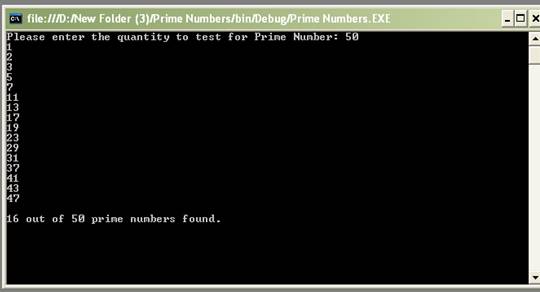
Some points in the rar file are listed below:
- Finding Prime Numbers
- Which All Prime Numbers Are Found In That Range
- How Many Prime Numbers Are There In That Range
Subscribe to:
Posts (Atom)


 Posts
Posts



